


Every Major UI Design Style Explained: From Glassmorphism to Spatial UI

Praveen Kumar
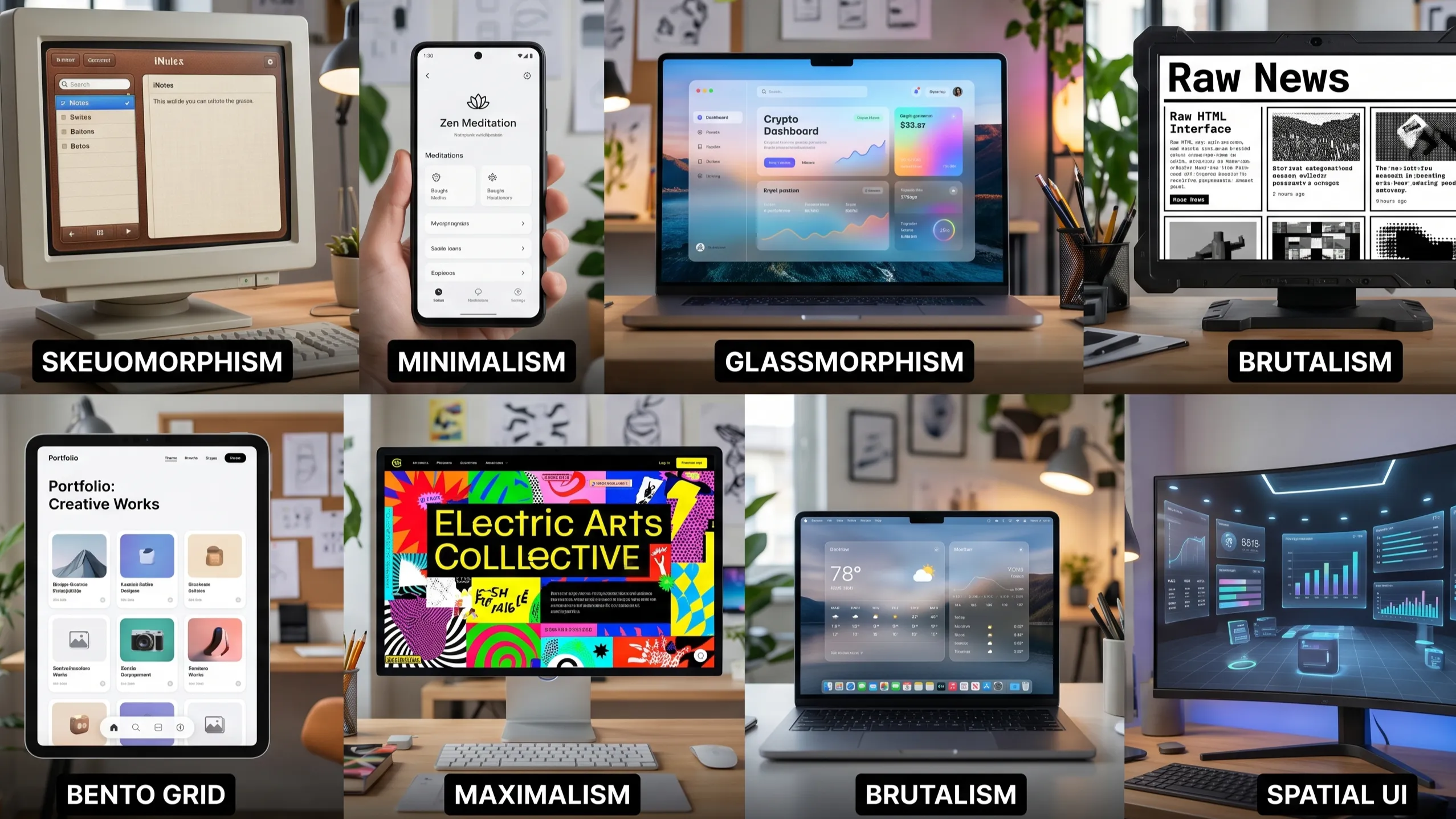
1. Skeuomorphism — Digital Objects That Look Real
Era: Early 2000s → Apple iOS 6 (2012) — and making a quiet return in 2026
Skeuomorphism is the practice of making digital UI elements look like their real-world physical counterparts. Buttons look pressable. Note-taking apps look like actual paper notebooks. Calendar apps look like physical desk calendars with leather binding. Volume controls look like actual knobs.
Apple popularized this style aggressively in the early iPhone era. Every app icon had depth, gloss, shadow, and texture. It was not just aesthetics — it was a deliberate UX choice. When smartphones were new and millions of people were using touchscreens for the first time, skeuomorphic design reduced the learning curve by making digital objects feel immediately familiar.
What defines it: Real-world textures (leather, paper, wood, metal), beveled edges, drop shadows, highlights that simulate a light source, and UI elements that mimic physical objects in shape and behavior.
Where it works: Music apps (faders and knobs), AR/VR interfaces where real-world familiarity reduces cognitive load, wearable apps on smartwatches, and any product targeting non-technical audiences who benefit from familiar metaphors.
Where it fails: While modern design has shifted toward flat and minimalist styles, excessive skeuomorphism of early web design has declined — though it may reappear in subtler forms to satisfy the need for real-world familiarity. When overdone, it makes interfaces feel heavy, cluttered, and visually dated.
Real examples: Early iOS apps (Newsstand, Find My Friends, Game Center), GarageBand's instrument interfaces, physical-style calculator apps.
2. Flat Design — The Reaction Against Realism
Era: 2012 → present (evolved into Material Design and Fluent Design)
Flat design emerged as a direct response to skeuomorphism's excesses. When Microsoft launched Metro UI in Windows Phone (2010) and Apple overhauled iOS to iOS 7 (2013), the design world shifted dramatically. Everything went 2D — no gradients, no shadows, no textures, no depth effects.
The philosophy was clarity through simplicity. Remove every visual element that does not carry functional meaning. Let content breathe. Use color and typography alone to create hierarchy instead of shadows and bevels.
What defines it: Solid colors with no gradients, simple geometric shapes, thin iconography, generous white space, minimal shadows, and typography doing the heavy lifting for hierarchy.
Where it works: Government and institutional websites, productivity tools, mobile apps that need fast rendering on lower-end devices, and any interface where information density matters more than visual personality.
Where it fails: Pure flat design can feel sterile and generic. Without visual cues like depth and shadow, interactive elements can be hard to identify — users sometimes cannot tell what is clickable and what is not. This led directly to the next evolution.
Real examples: Google's early Material Design (2014), Windows 10 Metro UI, most Android system UIs.
3. Glassmorphism — The Frosted Glass Effect
Era: 2020 → strongly present in 2026
Glassmorphism is one of the most visually distinctive UI trends of the current era. It simulates the appearance of frosted glass — UI elements that are semi-transparent, with the background blurred and subtly visible through them, creating a layered, airy depth.
Glassmorphism is a UI design trend that creates a frosted-glass effect using transparency, blurring, and subtle layering to give a sense of depth and hierarchy. It is inspired by real-world glass surfaces, where background elements remain partially visible but blurred, creating a soft and modern aesthetic.
Apple popularized it again with macOS Big Sur and Windows 11 adopted a similar language. You see it everywhere now — login modals, dashboard cards, navigation bars, and hero sections.
What defines it:
Background blur (backdrop-filter: blur() in CSS), semi-transparent fills (white or light colors at low opacity), subtle colored borders, soft drop shadows, and vibrant gradient backgrounds that show through the glass layers.
Where it works: Glassmorphism is used in modals, cards, login forms, and profile previews where designers want to separate UI elements without losing background context. It works especially well in dark mode settings, where contrast plays beautifully against blurred transparency.
Where it fails: Glassmorphism raises accessibility issues, especially for visually impaired users, as low-contrast elements can be difficult to perceive. It also performs poorly on lower-end devices where backdrop blur is computationally expensive.
Real examples: macOS Big Sur and Ventura system UI, Windows 11 taskbar and context menus, most modern SaaS dashboards (Linear, Vercel, Supabase), Apple Vision Pro's entire window system.
CSS fingerprint:
background: rgba(255, 255, 255, 0.15);
backdrop-filter: blur(12px);
border: 1px solid rgba(255, 255, 255, 0.2);
box-shadow: 0 8px 32px rgba(0, 0, 0, 0.1);
4. Neumorphism (Soft UI) — The Middle Ground
Era: 2020 → niche use, still relevant in 2026
Neumorphism — coined as "new skeuomorphism" — sits between flat design and skeuomorphism. It creates depth through subtle inner and outer shadows on the same background color, making UI elements appear to be extruded from or pressed into the surface itself. No textures, no gradients on the element — just soft directional shadows.
Neumorphism blends soft gradients, inner and outer shadows, and minimal contrast to create depth without noise. It's often used to make buttons, cards, and inputs appear tactile — like they're molded from the interface itself.
The effect is visually beautiful in design mockups and notoriously difficult to implement accessibly.
What defines it: Matching background and element color, two soft shadows (one light, one dark) applied on opposite corners to simulate a light source, and minimal color contrast — everything feels like it grows from a single material.
Where it works: Finance Apps, Dashboards, Smart Home UI, and Branding-Focused experiences. Health and wellness apps where calm aesthetics matter. Anywhere the audience values a premium, tactile feel over information density.
Where it fails: Neumorphism has a well-documented accessibility problem. Because elements are defined by shadow alone with no border or color contrast, users with visual impairments or in bright sunlight conditions struggle to identify interactive elements. It also fails at scale — when you have many elements on screen, the soft shadow system creates visual noise.
Real examples: Many fintech app concepts on Dribbble, some smart home dashboards, banking app redesigns.
5. Minimalism — Less, But Better
Era: 1960s Swiss Design roots → web since late 1990s → dominant today
Minimalism is not a trend — it is a design philosophy. It argues that every visual element must earn its place. If removing something does not break communication, it should be removed. The goal is clarity, speed, and focus. Nothing decorative, nothing redundant.
In digital product design, minimalism means generous white space, a restricted color palette (often monochromatic with one accent), limited typefaces, icon-free interfaces where text works, and layouts with strong grid discipline.
What defines it: White space as a design element, maximum 2–3 typefaces, restrained color palette, no decorative imagery, clear visual hierarchy through size and weight alone, and ruthless removal of anything non-functional.
Where it works: Editorial websites, portfolios, writing tools, productivity apps (Notion, Bear, Craft), premium e-commerce (Apple.com), and any product where cognitive load reduction is the primary UX goal.
Where it fails: Minimalism can feel cold and impersonal. For consumer products targeting emotional engagement — gaming, social apps, entertainment — minimalism can feel sterile. It also requires a very high level of typographic skill; bad minimalism just looks empty rather than refined.
Real examples: Apple.com product pages, Stripe's documentation, Vercel's website, Linear app, Notion, Medium's reading experience.
6. Maximalism — More Is More
Era: Always present as counterculture → surging in 2024–2026
If minimalism says "remove everything unnecessary," maximalism says "add everything meaningful." Maximalism in UI embraces layered visual complexity, rich imagery, bold type, dense color, patterns, textures, and intentional visual tension. It does not mean chaos — good maximalism is controlled excess with a strong visual hierarchy underneath the richness.
Think of luxury fashion brand websites — Gucci, Balenciaga — or experimental creative portfolios that use every pixel as an opportunity for visual expression.
What defines it: Multiple typefaces used together, rich full-bleed imagery, overlapping elements, dense color palettes, decorative patterns, bold contrast, and willingness to make the user's eyes work harder in exchange for a memorable experience.
Where it works: Fashion and lifestyle brands, creative agencies and portfolios, music and entertainment platforms, cultural institutions, and any brand where personality and differentiation matter more than neutrality.
Where it fails: Maximalism executed poorly becomes visual noise. It can overwhelm users, slow navigation, and make finding information frustrating. It is almost never the right choice for enterprise SaaS, health applications, or any context where users are trying to complete a task efficiently.
Real examples: Gucci.com, Rick Owens brand pages, many music streaming visual campaigns, edgy creative agency portfolios.
7. Brutalism — The Anti-Design Design
Era: Architecture roots (1950s) → web UI resurgence 2018 → strong in 2026
Brutalist UI design takes its name from brutalist architecture — the raw, exposed-concrete aesthetic of buildings that refuse to hide their structure. In UI, it translates to interfaces that deliberately reject the smoothness, polish, and conventions of mainstream web design.
Raw, unpolished aesthetics. High-contrast color schemes that refuse to blend in. Deliberately unconventional layouts. If minimalism is about refinement, brutalist UI is about rebellion. Inspired by brutalist architecture, this trend embraces the raw, the unpolished, and the intentionally jarring.
Brutalism breaks rules on purpose — asymmetric layouts, monospaced fonts, heavy black borders, stark backgrounds, and zero gradients or soft shadows. It is a statement against corporate polish.
What defines it: Raw HTML-like aesthetics, black borders and outlines, monospaced or grotesque typefaces at aggressive sizes, harsh contrast (black and white with one brutal accent color), no rounded corners, overlapping or misaligned elements used intentionally, and a visual language that says "we do not follow conventions."
Where it works: Brutalist design is a good fit for content that is more experimental or meant to provoke thought, such as art collectives, indie brands, or activist websites. Developer tools targeting a technical audience, indie media publications, streetwear brands, and any product where standing out is the primary goal.
Where it fails: Enterprise software. Healthcare. Finance. Government. Any context where trust, clarity, and accessibility are non-negotiable. Brutalism can read as unfinished or broken to non-technical audiences.
Real examples: Bloomberg.com's editorial design has brutalist elements, many indie developer tool landing pages, Stripe Press, itch.io (game distribution platform).
8. Bento Grid UI — Organized Complexity
Era: Popularized 2022–2023 → dominant in 2024–2026
The bento grid gets its name from the Japanese bento box — a compartmentalized lunch container where different foods sit in separate, neatly organized sections without bleeding into each other. Applied to UI, it creates modular grid layouts where content blocks of varying sizes coexist on the same grid, each self-contained.
Bento box design divides content into clearly separated sections within a grid, similar to Japanese lunch boxes. It is well-suited for displaying various types and amounts of content together (text, images, video, data), such as on dashboards or portfolio pages. Its major advantage is that it improves content organization and scannability, and since it allows for playful arrangements within the grid, it can also make the interface visually more interesting.
Apple has used bento grids extensively in its product marketing pages and in system UI layouts. The style is now standard in SaaS feature showcases and modern dashboards.
What defines it: CSS Grid-based layouts with cards of different sizes (1×1, 1×2, 2×2, 1×3), each card containing a single type of content, clear padding and gap between cards, and visual hierarchy achieved through card size rather than color or typography alone.
Where it works: This approach shines in dashboards, e-commerce sites, and product pages, where clear organization is crucial. Feature showcase sections, analytics dashboards, portfolio pages, app store listings, and product marketing sites.
Where it fails: Pure content sites — blog posts, long-form reading — do not benefit from bento grids. If the content does not naturally divide into discrete, scannable chunks, forcing it into a bento grid creates artificial structure.
Real examples: Apple.com product feature sections (iPhone, MacBook), Linear's feature showcase, most modern SaaS landing pages (Vercel, Railway, PlanetScale), Google Pixel product pages.
9. Spatial UI — Designing for Three Dimensions
Era: AR/VR experimentation since 2016 → serious emergence with Apple Vision Pro (2024–2026)
Spatial UI is the most significant paradigm shift in interface design since the touchscreen. It describes UI designed for spatial computing environments — AR glasses, VR headsets, and mixed reality devices — where the interface exists in three-dimensional space around the user rather than on a flat screen.
The leading spatial computer, Apple Vision Pro, has a three-dimensional user interface that responds to natural actions such as eye tracking, hand movements, and voice commands. It combines the digital and physical worlds through this new input system that responds to your eyes, hands, and voice, providing limitless opportunities for productivity, entertainment, and immersion.
When people wear Apple Vision Pro, they enter an infinite 3D space where they can engage with your app or game while staying connected to their surroundings.
What defines it: UI windows that float in physical space, depth as a navigation metaphor (near elements are primary, far elements are background), glassmorphic surfaces by default (to let the physical world show through), eye-tracking and pinch-gesture input replacing touch and mouse, and spatial audio tied to UI element positions.
Design principles unique to spatial UI:
- Avoid solid, opaque backgrounds that block the user's view. Use system-defined glass material to let the physical world show through.
- Display content within the user's field of view, aligning it with their head to avoid unnecessary head movements. Avoid jarring motion, excessively fast transitions.
- Content should expand horizontally, not vertically — neck tilting up and down is more fatiguing than left and right.
Where it is heading: Analysts increasingly view Vision Pro as a first-generation reference design — the equivalent of the original Macintosh: bulky, expensive, but direction-setting. As hardware becomes lighter and software becomes smarter, spatial computing will move from novelty to a core component of digital workflows.
Real examples: Apple visionOS system UI, Apple Vision Pro versions of Safari and Photos, spatial gaming environments, medical visualization tools.
10. Claymorphism — The Friendly 3D Style
Era: 2021 → still popular in 2026 for consumer and youth-focused products
Claymorphism gives UI elements a soft, inflated, 3D quality — as if they were made from modeling clay or puffy stickers. Where neumorphism uses subtle shadows to suggest depth on a flat surface, claymorphism goes full cartoon-3D with rounded, exaggerated shapes, pastel colors, and inner glow effects.
Claymorphism takes a softer approach, giving UI elements a 3D, rounded, almost playful feel, with soft shadows and muted colors — usually accompanied by similar style graphics.
What defines it: Exaggerated border radii, inner shadow + outer shadow combination to create a puffy 3D effect, pastel color palette, soft illustrated elements alongside UI components, and a toy-like approachable personality.
Where it works: Children's apps, EdTech platforms, gamified products, food and lifestyle apps, consumer apps targeting younger demographics, and any product that wants to feel approachable, friendly, and fun.
Where it fails: Enterprise. Finance. Healthcare. Any context where users need to feel trust in the product's seriousness.
Real examples: Duolingo's UI elements, many casual mobile game UIs, some food delivery app icon systems.
Quick Reference: Which Style for Which Product
| UI Style | Best For | Avoid For | Complexity |
|---|---|---|---|
| Skeuomorphism | AR/VR apps, music tools, onboarding for non-tech users | Enterprise SaaS, modern web apps | High |
| Flat Design | Government sites, productivity tools, information-dense apps | Brand-heavy consumer apps | Low |
| Glassmorphism | Dashboards, SaaS, dark-mode apps, modals | Accessibility-critical apps, low-end devices | Medium |
| Neumorphism | Fintech, smart home UI, branding concepts | High-density data interfaces, accessibility-required | Medium |
| Minimalism | Editorial, SaaS, portfolios, premium e-commerce | Entertainment apps, social platforms | Low–Medium |
| Maximalism | Fashion, music, creative agencies | SaaS, healthcare, finance, productivity | Very High |
| Brutalism | Creative/indie brands, developer tools, art | Enterprise, healthcare, government, finance | Medium |
| Bento Grid | Dashboards, feature showcases, portfolios | Blog posts, long-form content, simple landing pages | Medium |
| Spatial UI | AR/VR apps, mixed reality environments | 2D web/mobile (unless as aesthetic reference) | Very High |
| Claymorphism | EdTech, children's apps, food/lifestyle, gaming | Enterprise, finance, healthcare | Medium |
The Real Rule: Style Follows Purpose
Every style in this list has produced genuinely great products and genuinely terrible ones. The deciding factor is never the style itself — it is whether the style serves the product's purpose, audience, and context.
A few questions worth asking before picking a direction:
Who is your user? A senior enterprise procurement manager and a college student using a fitness app have different comfort levels with visual complexity and unconventional layouts.
What is the primary task? If users come to complete a task — book a service, file a report, track an order — minimize visual friction. If they come to explore or be entertained, visual richness earns its keep.
What does your brand need to communicate? Trust (minimalism, flat), innovation (glassmorphism, spatial), creativity (maximalism, brutalism), warmth (claymorphism), or premium quality (neumorphism, glassmorphism)?
What are the technical constraints? Glassmorphism's backdrop blur is expensive on mobile. Claymorphism's complex shadows add asset weight. Spatial UI requires entirely different tooling and hardware. Knowing your deployment environment narrows your options quickly.
The best interfaces in 2026 do not pick one style and apply it everywhere. They understand the vocabulary of each style, know what each communicates, and make intentional choices — using glassmorphism for elevated moments, flat design for information-dense sections, and bento grid for feature showcases — all within a coherent visual system.
Design is a language. These styles are its dialects. Learn them all, then speak the one your product actually needs.
What This Means for Your Web or App Project
At APXTECK, we work with Indian SMBs to design and build web platforms, apps, and dashboards. One of the most common mistakes we see is teams picking a UI style because it looked great on Dribbble — without asking whether it fits their users, their technical constraints, or their business context.
If you are building a business platform, a customer portal, or a service-based website and want guidance on which design direction fits your product — we design and build it.
Talk to us about your project → https://www.apxteck.com/portfolio
Article Comments
You must be signed in to post comments.
Sign In to Join the Discussion →No comments approved yet. Be the first to share your thoughts!
About the Author

Praveen Kumar
Software Developer
software Developer
Related Insights

UPI MDR Is Back — Ashneer Grover Is Half Right | APXTECK

Amodei Wants to Slow AI. Indian SMBs, Read This First | APXTECK

How Blinkit's Free Ambulance Became Its Best Marketing Move

GPT-6 Astra: OpenAI’s New AI Model Could Change Software Development and Business Work

AI-Powered Cyberattacks Are Rising: Why Every Business Needs Stronger Cybersecurity Now

How Next.js and Generative Search Help Builders Win Leads
Build Your Own Food Delivery App: Stop Giving Your Profits to Swiggy & Zomato