

HTTPS vs WebSockets: What's the Difference and When to Use Each

Praveen Kumar
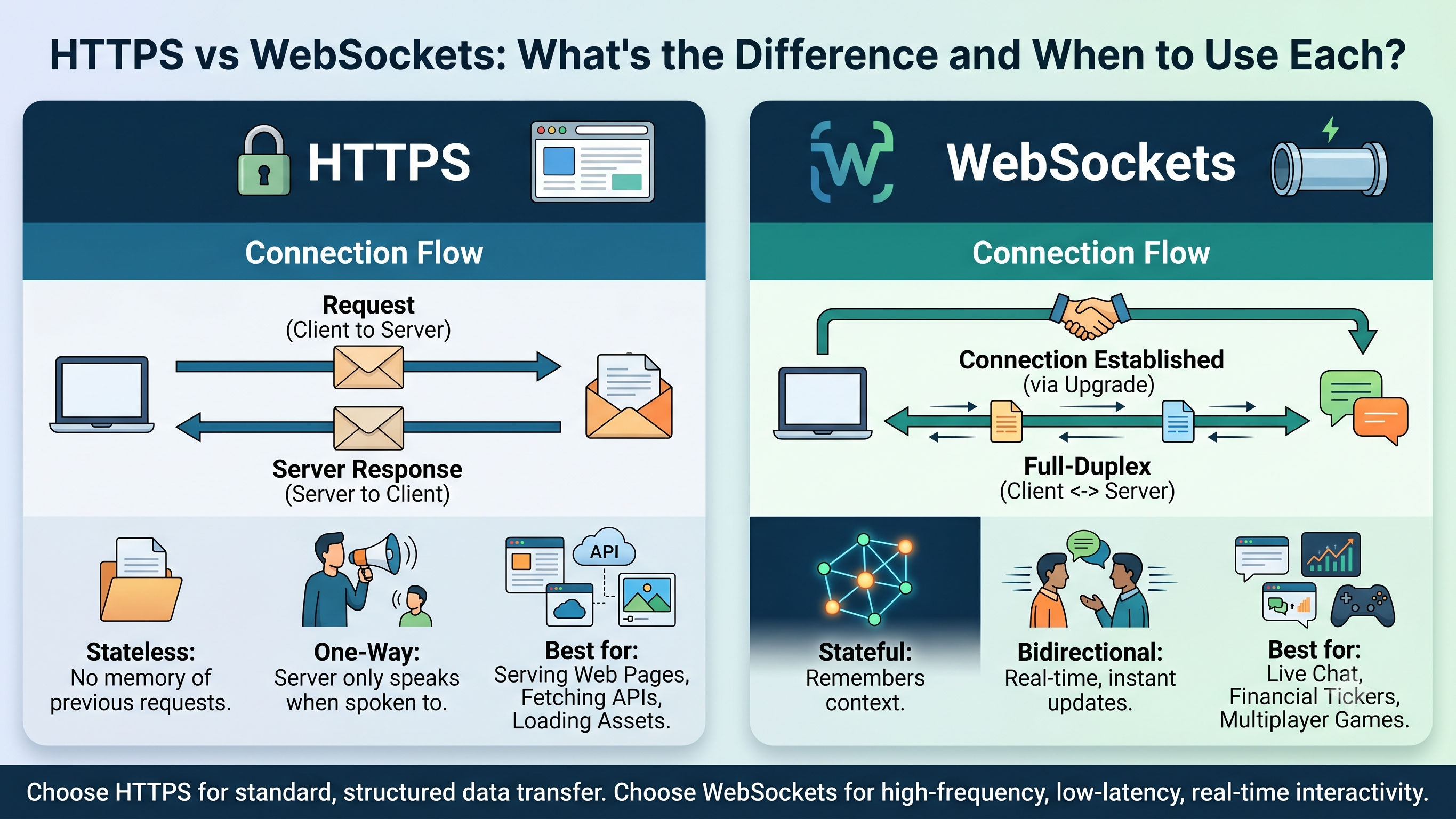
What Is HTTPS?
HTTPS (HyperText Transfer Protocol Secure) is the foundation of the web. Every time you open a website, submit a form, or call a REST API, you are using HTTP under the hood — with TLS encryption layered on top for security (that is the "S").
HTTP follows a strict request-response cycle. The client sends a request, the server processes it, the server sends a response, and the connection closes. That is it. The server cannot contact the client unless the client asks first. Communication is always client-initiated, one direction at a time, and stateless — the server remembers nothing about you between requests.
Think of HTTPS like sending a letter. You write to the post office asking for information. They write back with an answer. If you want to know something new tomorrow, you have to write another letter. They will never contact you on their own.
If you want to check whether your order status changed, you have to ask again. And again. And again. This is called polling — and it is exactly as inefficient as it sounds.
What Are WebSockets?
WebSockets are a different protocol entirely — one designed specifically for persistent, two-way, real-time communication between a client and a server.
Instead of the client repeatedly asking "anything new?", a WebSocket opens a single persistent connection that stays open. Either side — client or server — can send data at any time without waiting for the other to ask first.
Think of WebSockets like a phone call. Once both parties pick up, either one can speak at any moment. The line stays open until one side deliberately hangs up. No letters, no waiting — just live, continuous conversation.
WebSockets actually begin with a regular HTTPS request — a special handshake where the client says "I want to upgrade this connection to WebSocket." The server agrees, and from that moment the protocol switches. It is no longer HTTP. The connection stays alive, and both sides can push messages freely at any time.
Side-by-Side Comparison
| Feature | HTTPS | WebSockets |
|---|---|---|
| Communication direction | One-way (client asks, server answers) | Two-way (both sides simultaneously) |
| Connection lifetime | Short-lived per request | Persistent, stays open |
| Who initiates data | Always the client | Either client or server |
| State | Stateless — server forgets you | Stateful — server knows you are connected |
| Overhead per message | High (full headers every request) | Low (minimal overhead after handshake) |
| Best for | REST APIs, page loads, form submissions | Chat, notifications, live feeds, gaming |
| Caching support | Yes | No |
| Load balancer friendly | Very easy | Requires extra configuration |
Real-World Use Cases
Use HTTPS when:
Fetching data on demand — A customer opens their order history page. The app asks the server for the list, gets it, and displays it. This is a one-time fetch triggered by the user. HTTPS is perfect.
Submitting forms — A user fills out a service request form and hits submit. The app sends the data to the server and waits for a success or failure response. Classic request-response. HTTPS is the right tool.
Standard API calls — Creating a payment, uploading a file, fetching a blog post, logging in, resetting a password — all of these are operations where the client asks and the server answers. HTTPS handles all of them cleanly.
Use WebSockets when:
Real-time notifications — An admin assigns a task to an employee. The employee should see a notification badge appear on their screen immediately — without refreshing the page. The server needs to push that notification the moment it is created. HTTPS cannot do this. WebSocket can.
Live chat — Two users messaging each other. Messages must appear on both screens the instant they are sent. If you used HTTPS polling here — checking for new messages every few seconds — there would be a noticeable delay and the server would be processing thousands of unnecessary requests per minute.
Live order or request status updates — A customer is watching their service request move from "In Review" to "In Progress" to "Completed." Instead of the customer refreshing every 30 seconds, the server pushes the status change the moment an admin updates it. The page updates automatically.
Collaborative tools — Multiple users working on the same document simultaneously, like Google Docs. Every change one user makes needs to appear on every other user's screen in milliseconds. Only a persistent two-way connection makes this possible.
Live dashboards and stock tickers — Data that changes every second needs to be shown in real time. If every connected user was polling via HTTPS every second, a server with 500 active users would receive 500 requests per second just for dashboard updates — most returning unchanged data. One WebSocket connection per user eliminates almost all of that waste.
The Common Mistake: Using Only One of Them
Many teams either try to replace WebSockets with aggressive polling, or they try to handle everything through WebSockets. Both are wrong.
The polling problem — Making an HTTPS request every few seconds to check for new data feels like a solution, but it hammers your server with requests, most of which return nothing new. With a few hundred active users this becomes a serious performance problem fast.
The WebSocket-for-everything problem — WebSockets are stateful and persistent, which makes them harder to scale, harder to load balance, and wrong for operations like form submissions or file uploads that are naturally request-response by nature.
The right architecture uses both together. HTTPS handles everything that is request-driven. WebSocket handles everything that is event-driven. Your app loads data via HTTPS when a page opens. After that, WebSocket keeps it live by pushing updates the moment they happen.
This is exactly how production platforms like Slack, Linear, Notion, and Swiggy's order tracking work. The page loads via HTTPS. Everything that updates in real time comes through a WebSocket.
Security: Encrypted WebSockets
Just like HTTPS encrypts regular HTTP with TLS, WebSocket has a secure version — wss:// (WebSocket Secure) — that encrypts all traffic with TLS. Always use wss:// in production. The unencrypted version, ws://, should never be used in a live application.
In practice, if your server is already running behind Nginx with SSL configured, your WebSocket connections inherit that encryption automatically. No extra setup needed on the application side.
The Real-World Mental Model
Here is the simplest way to decide which one to use for any feature:
Ask: who needs to start the conversation?
If the user triggers an action and needs a response — form submit, page load, button click, file upload — that is HTTPS. The user is starting the conversation.
If the server needs to tell the user something the moment it happens — new message, status change, payment confirmation, new notification — that is WebSocket. The server needs to start the conversation.
Most production applications need both. Build your REST API in HTTPS. Layer WebSockets on top for anything that needs to be live.
Summary
HTTPS and WebSockets are not competitors. They are complementary tools that solve different problems.
Use HTTPS for everything request-driven — fetching data, submitting forms, authenticating users, uploading files. Stateless, cacheable, and the backbone of the entire web.
Use WebSockets for everything event-driven — notifications, live status updates, chat, collaborative features. Stateful, persistent, and the only clean way to let your server speak first.
If your product has any real-time requirement — and most modern web apps do — you need both working together.
Published by APXTECK — Backend Development and Web Platform Experts for Indian SMBs. We build Node.js backends, real-time systems, and full-stack platforms. See our services → https://www.apxteck.com/services
Article Comments
You must be signed in to post comments.
Sign In to Join the Discussion →No comments approved yet. Be the first to share your thoughts!
About the Author
Praveen Kumar
Software Developer
software Developer