


MCP Servers Are the Biggest Developer Productivity Shift of 2026

Praveen Kumar
MCP Servers Are the Biggest Developer Productivity Shift of 2026
Here's the problem every developer using AI coding assistants hits within the first week: the AI can write code, but it can't see anything outside your editor. It doesn't know your database schema. It can't read your Figma designs. It has no idea what's in your Postman collections, what's failing in Sentry, or what tasks are open in Linear.
So you end up copy-pasting. Schema dumps, error logs, design specs, API documentation — you become a human clipboard shuttling context from ten different tools into a chat window. The AI is brilliant once it has context, but getting it that context is manual, tedious, and error-prone.
Model Context Protocol (MCP) fixes this. And if you're an Indian developer using Cursor, VS Code, or Claude Code in 2026 and you haven't set up MCP servers yet, you're leaving the biggest productivity gain of this year on the table.
What MCP Actually Is (The 30-Second Version)
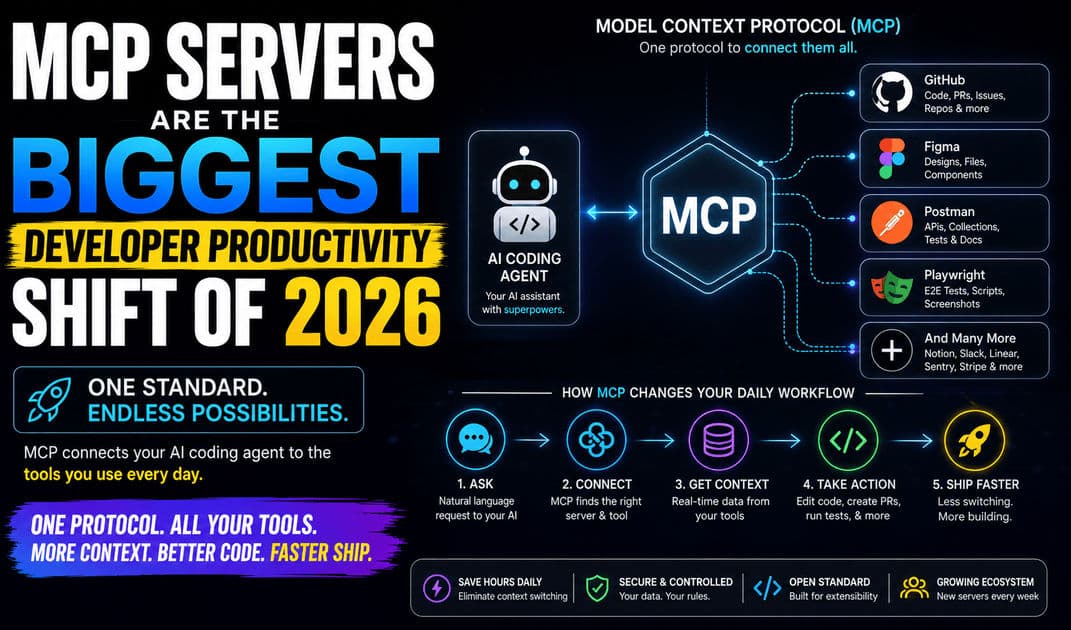
MCP is an open protocol created by Anthropic in November 2024 that standardises how AI applications connect to external tools. Think of it as USB-C for AI — one universal interface that lets any AI client (Cursor, VS Code Copilot, Claude Code, Windsurf) talk to any external service (GitHub, Figma, PostgreSQL, Slack) through a standard connection.
Before MCP, every integration was custom. A GitHub integration in Cursor needed completely different implementation than the same integration in VS Code. Multiply that by dozens of tools and you get an unmaintainable mess. MCP collapses that N×M integration problem into a simple architecture: AI clients speak MCP on one side, tools expose MCP servers on the other, and everything just connects.
The adoption numbers tell the story. The MCP SDK hit 97 million combined monthly downloads by early 2026. Over 14,000 MCP servers exist on public registries. Anthropic donated MCP governance to the Linux Foundation's Agentic AI Foundation in December 2025, cementing it as a vendor-neutral industry standard. Every major AI coding tool now ships native MCP support.
How MCP Works in Your Editor
The setup is simpler than most developers expect. You configure MCP servers in a JSON config file (in Cursor, VS Code, or Claude Code), pointing to either a local server process or a remote HTTP endpoint. When your AI agent needs to interact with an external tool — say, creating a GitHub PR or reading a Figma design — it calls the MCP server, which handles authentication, makes the API call, and returns structured data back into the agent's context.
The practical result: instead of copying your PostgreSQL schema into a chat window, you tell Cursor "add a user role column to the accounts table" and it reads the live schema from your PostgreSQL MCP server, understands the existing structure, and generates the correct migration. Instead of taking screenshots of Figma designs and describing them to your AI, the Figma MCP server streams the actual component hierarchy, spacing tokens, and layout constraints directly into the agent's context window.
This is the interaction model shift that matters. Your AI agent goes from "smart but blind" to "smart and connected."
The MCP Servers That Actually Matter
There are 14,000+ MCP servers on public registries. Most are experiments, abandoned repos, or security risks — a recent audit found that 66% of scanned servers had security findings. Here are the servers that production developers are actually using, organised by the workflow they unlock.
GitHub MCP: The One You Install First
GitHub's official MCP server is the most essential integration in the ecosystem. It gives your AI agent full GitHub access: searching code across repositories, creating branches, opening PRs, reviewing code, commenting on issues, and triggering GitHub Actions workflows.
The real workflow gain is in code review and PR management. Instead of switching between your editor and the GitHub web UI, you tell your agent "review the open PRs on our API repo and summarise any that touch the auth module." The agent reads the diffs through MCP, analyses the changes, and reports back — all inside your editor.
For Indian freelancers managing multiple client repositories, this eliminates one of the biggest time sinks: the constant context-switching between editor, browser, and different GitHub organisations.
Figma MCP: Design-to-Code Without Screenshots
Figma's MCP server launched in partnership with both Anthropic and OpenAI in February 2026, and it fundamentally changes the design-to-development handoff. Instead of exporting screenshots or manually inspecting design panels, your coding agent reads the actual Figma file — component names, layout constraints, spacing tokens, font styles, and the complete layer tree.
The workflow is genuinely bidirectional. Your agent reads Figma designs to generate code that matches the exact specs. And with the newer Code to Canvas feature, you can push rendered UI from your code back into Figma as editable frames. Designers iterate on the real implementation, not an outdated mockup.
For Indian dev agencies doing client work, this cuts the "but this doesn't match the design" feedback loop from days to minutes. The agent doesn't interpret the design — it reads the structured design data directly.
Google Stitch MCP: Free AI Design in Your Editor
Google Stitch ships its own MCP server that plugs directly into Claude Code, Cursor, and Gemini CLI. The workflow is different from Figma's — instead of reading existing designs, Stitch generates UI designs from prompts and exports production-ready code in seven frameworks (HTML/CSS, Tailwind, Vue, Angular, Flutter, SwiftUI, React).
With Stitch MCP configured, you prompt Claude Code with "design and implement a dark-mode analytics dashboard with sidebar navigation" and the agent calls Stitch as a tool, generates the UI, and implements it in your codebase. No context switching to a browser tab. Stitch also exports a DESIGN.md file with your design tokens — colours, typography, spacing — giving your agent a stable reference for keeping component styles consistent.
Stitch is completely free through Google Labs (350 generations/month quota), making it particularly relevant for Indian developers and freelancers who can't justify ₹1,100/month per Figma editor seat for prototyping work.
Postman MCP: API Testing Without Leaving Your Editor
Postman's official MCP server (available on npm as @postman/postman-mcp-server) exposes Postman's full API as tools that any AI agent can call. Create collections, add requests, run tests, fetch results, manage environments — all through natural language prompts in your editor.
The killer use case: you build an API endpoint, then tell your agent "create a Postman collection for the user management API with GET, POST, and DELETE endpoints, set the base URL to localhost:3000, and run the collection." The agent creates the collection, configures the requests, executes them against your running server, and reports the results. Postman ships three tool profiles — Minimal (core essentials), Code (for building integrations), and Full (every capability) — so you can scope the token overhead to your actual needs.
For Indian backend developers who spend significant time switching between their editor and Postman for API testing, this integration collapses two separate tools into one workflow.
Playwright MCP: Browser Automation Through Your Agent
Microsoft's Playwright MCP server is one of the most-starred servers in the ecosystem, with over 30,000 GitHub stars. It gives your AI agent direct browser control across Chromium, Firefox, and WebKit — navigation, form filling, screenshots, element interaction, and end-to-end testing.
The notable design choice: Playwright MCP uses accessibility trees rather than screenshots to represent page state. This gives the agent structured data ("the Sign In button is enabled, the email field contains...") instead of pixel interpretation, making it dramatically more reliable for automated testing and scraping workflows.
The practical workflow: you tell your agent "write and run an E2E test for the login flow on our staging environment." The agent writes the test using Playwright, executes it through the MCP server, captures any failures with accessibility tree snapshots, and reports what broke. No separate Playwright terminal session needed.
The Rest of the Essential Stack
Beyond these five, several other MCP servers have proven their value in production workflows. Context7 (54,000+ GitHub stars) injects version-specific documentation into your agent's context, solving the stale-docs hallucination problem — your agent reads the current React 19 docs, not the React 17 patterns it memorised from training data. Sentry MCP connects error monitoring with AI-powered root cause analysis. PostgreSQL/Supabase MCP lets your agent query databases with natural language. Slack MCP enables reading channels and sending messages directly from your editor. Linear MCP connects your project management directly to your coding workflow.
The Three-Server Rule
Here's the counterintuitive advice nobody gives you: don't install more than three to five MCP servers simultaneously.
Each MCP server adds 500-1,000 tokens per tool to your context window. Five servers with 15 tools each consume 50,000-75,000 tokens before you ask a single question. That's real money at API pricing, and it degrades response quality because the model has to sift through dozens of available tools to pick the right one.
A Scalekit benchmark found that MCP tool calls cost 10-32x more tokens than equivalent CLI commands. The convenience is real, but so is the overhead.
The smart approach: pick the three servers that address your most frequent context-switching pain points. For most Indian backend developers, that's GitHub MCP + PostgreSQL MCP + Postman MCP. For frontend developers, it's GitHub MCP + Figma MCP (or Stitch MCP) + Playwright MCP. Start there, measure the workflow improvement, and add servers only when you have a specific, recurring problem they solve.
Setting Up MCP in Cursor and VS Code
The setup process is nearly identical across both editors.
In Cursor, you add MCP server configurations to your project's .cursor/mcp.json file or the global MCP settings. Each entry specifies the server command, arguments, and environment variables (typically API keys). Cursor's agent mode automatically discovers available MCP tools and uses them when relevant to your prompt.
In VS Code, MCP support arrived natively in version 1.99 through the Chat panel and GitHub Copilot extension. Configuration lives in your settings.json or workspace-level MCP config files. The integration works with Copilot's agent mode, giving your AI assistant the same external tool access.
Claude Code supports MCP through its CLI configuration, with the added benefit of Claude's extended thinking capabilities for complex multi-tool workflows.
All three editors support both local MCP servers (running as processes on your machine via stdio) and remote MCP servers (connecting over HTTP). Remote servers are the emerging pattern — Postman, GitHub, and Figma all offer hosted remote MCP endpoints that require zero local setup beyond adding your API key.
Security: The Part Nobody Reads (But Should)
MCP servers have direct access to your external tools, often with write permissions. A GitHub MCP server with a broad-scoped token can create branches, merge PRs, and trigger deployments. A PostgreSQL MCP server with write access can modify production data.
The April 2026 OX Security disclosure found systemic RCE vulnerabilities across MCP SDK implementations in multiple languages. Over 30 CVEs were filed in January-February 2026 alone. This isn't theoretical risk — it's active, documented vulnerability.
Three rules for Indian development teams deploying MCP. First, use only vendor-maintained servers (GitHub's official server, Figma's official server, Postman's official server) or Linux Foundation reference implementations. Avoid random community servers without auditing the code. Second, scope your API tokens to the minimum required permissions — read-only where possible, specific repositories instead of organisation-wide access. Third, never connect MCP servers to production databases or production GitHub repositories without explicit review gates.
What Indian Developers Should Do This Week
If you've read this far and you're not using MCP servers yet, here's your concrete next step: install GitHub MCP in Cursor or VS Code today. It takes five minutes — generate a personal access token on GitHub, add three lines to your MCP config file, restart your editor. Then spend one day on your normal workflow and notice how many times the agent resolves a question by checking GitHub directly instead of you alt-tabbing to a browser.
That single integration, used for one day, will tell you everything you need to know about whether MCP fits your workflow. For most developers, the answer is an emphatic yes — and then the question becomes which servers to add next, not whether to adopt MCP at all.
The era of copy-pasting context into AI chat windows is ending. MCP makes your AI agent a first-class citizen in your entire development toolchain. The developers who set this up now will be materially faster than those who discover it six months from now.
Published by APXTECK — AI-powered IT solutions for Indian developers and SMBs. Need help setting up MCP integrations or building custom MCP servers for your internal tools? Visit apxteck.com/services.
Article Comments
You must be signed in to post comments.
Sign In to Join the Discussion →No comments approved yet. Be the first to share your thoughts!
About the Author

Praveen Kumar
Co-Founder & DirectorFull-Stack Developer, APXTECK
Praveen Kumar is the Co-Founder and Full-Stack Developer at APXTECK, an AI-powered IT agency helping Indian SMBs grow through web development, automation, and AI integration. He builds production-grade systems using Node.js, Next.js, PostgreSQL, and modern AI APIs. When he is not shipping code, he is writing about practical technology that actually works for Indian businesses.
Related Insights

Why Uber Burned Its Yearly AI Budget in Only Four Months

Lightning-Fast Websites with Premier Next.js Development

Claude Code Loops Explained: Why Prompts Alone Won't Cut It

Are You Doing Dark Mode Wrong? 5 Psychological Color Mistakes Destroying Your UX

I Mastered Claude So You Don't Have To (Beginner to Advanced)

Claude Tag Makes AI a Teammate. That's the Trap.

Vibe Coding Is a Trap (Escape Before It's Too Late)